
OnlyFans billing creates refund questions the moment a charge and an access period stop lining up. This guide answers the title’s promise directly: it maps the refund windows and the billing edge cases that decide whether a request qualifies. BestOnlyFans publishes ranking criteria openly, and the same criteria logic applies to reading your own statement. BestOnlyFans refreshes its rankings every month.
The deciding factors are where a failure lands inside the billing period, what counts as delivered access, and how renewal timing shaped the charge. Treat this as a practical reference rather than a set of guarantees, because outcomes rest on facts you can document.

Where the Billing Cycle Creates Edge Cases
A subscription charge buys a period of access, not a calendar month tied to your bank statement. That gap between the billing date and the access period is where most edge cases begin. If a problem appears on day two of a paid period, the remaining days carry weight in the review.

The table below frames the three cycle positions that generate the most disputes.
| Cycle position | What is charged | Refund relevance |
|---|---|---|
| Renewal date | Base subscription repeats at the current price | Timing of your cancellation attempt decides the outcome |
| Mid-cycle | PPV unlocks, paid chat messages, tips | Each purchase stands separate from the base subscription |
| After cancellation | Nothing new is charged | Access continues until the paid period ends |
When a creator raises the price, auto-renew stops, and existing access lasts until the paid period ends. Subscribers who spot a price change and assume they were billed early usually find the charge came from a different line item.
Free pages behave differently again. A page set to $0 earns through pay-per-view messages and tips, so there is no base charge to dispute at all. Refund questions on free pages almost always concern one specific unlock rather than a subscription.

Access Failure vs Content Dislike
Access failure means the thing you paid for did not arrive: the page would not load, a subscription never activated, or a charged renewal produced no working access. Preference means the content arrived and simply was not what you hoped for.
Platforms generally treat the first category as refund-eligible and the second as final. That line is not arbitrary. A subscription pays for access to a creator’s page, not for a guaranteed reaction to it.
| Scenario | Access delivered | Typical outcome |
|---|---|---|
| Subscription charged, page never loads | No | Access failure; strongest refund position |
| PPV unlocked but media will not play | No | Technical failure tied to one purchase |
| Content posted less often than expected | Yes | Preference; generally not refundable |
| Renewal charged during an unused period | Yes | Depends on cancellation timing |
Here is the practical split most support teams apply:
- Usually qualifies: charged but no access, duplicate charge for one period, subscription that never activated after payment.
- Usually does not qualify: content style, posting frequency, a change of mind, or a page that matched its description but not your taste.
- Depends on evidence: partial access, a page that worked for days then stopped, or a charge that appeared after a cancellation attempt.
Tip: write down what happened within 24 hours. Support decisions lean heavily on timestamps, and reconstructed details are weaker than notes made the same day.

Mid-Cycle Price Changes and Refund Relevance
The rule is clean: a creator raising the price stops auto-renew, and existing access continues until the paid period ends.
That means a mid-cycle price change is not, by itself, grounds for a refund. The charge you are asking about was made at the old rate under the old terms. What the change does give you is a decision point: renew at the new price or let access lapse.
Why Promotional Pricing Complicates the Picture
Promotional first months can sit below the standard minimum, for example a $3 first month. Paid base subscriptions run from $4.99 to $49.99, with most clustering between $5 and $10. When a promotional month ends, the renewal returns to the standard rate, and that jump can feel like an error when it is not.
If you see a renewal that looks higher than expected, check whether the previous charge was promotional. The refund question then depends on whether you cancelled before the renewal date. A price raise that already stopped auto-renew cannot generate a surprise charge at the new rate.

When Auto-Renew Fires After a Break
The most common refund request starts with a sentence like this: I forgot to cancel. Renewal dates are fixed, so a busy week can carry a charge past the point where you meant to stop. Whether that request succeeds usually comes down to how quickly you acted and whether access was used after the charge.
These are the situations where renewal charges surprise subscribers most:
- You cancelled after the renewal date but believed the cancellation was early enough.
- You returned after months away and an old subscription was still active.
- You switched payment methods and the old one quietly renewed.
- You shared a device or browser and lost track of an active subscription.
Timing the request matters. Contact support as soon as you notice, before using the newly paid period. A request sent within hours of the charge, describing an unused period, reads very differently from one sent two weeks later with a page full of activity in between.
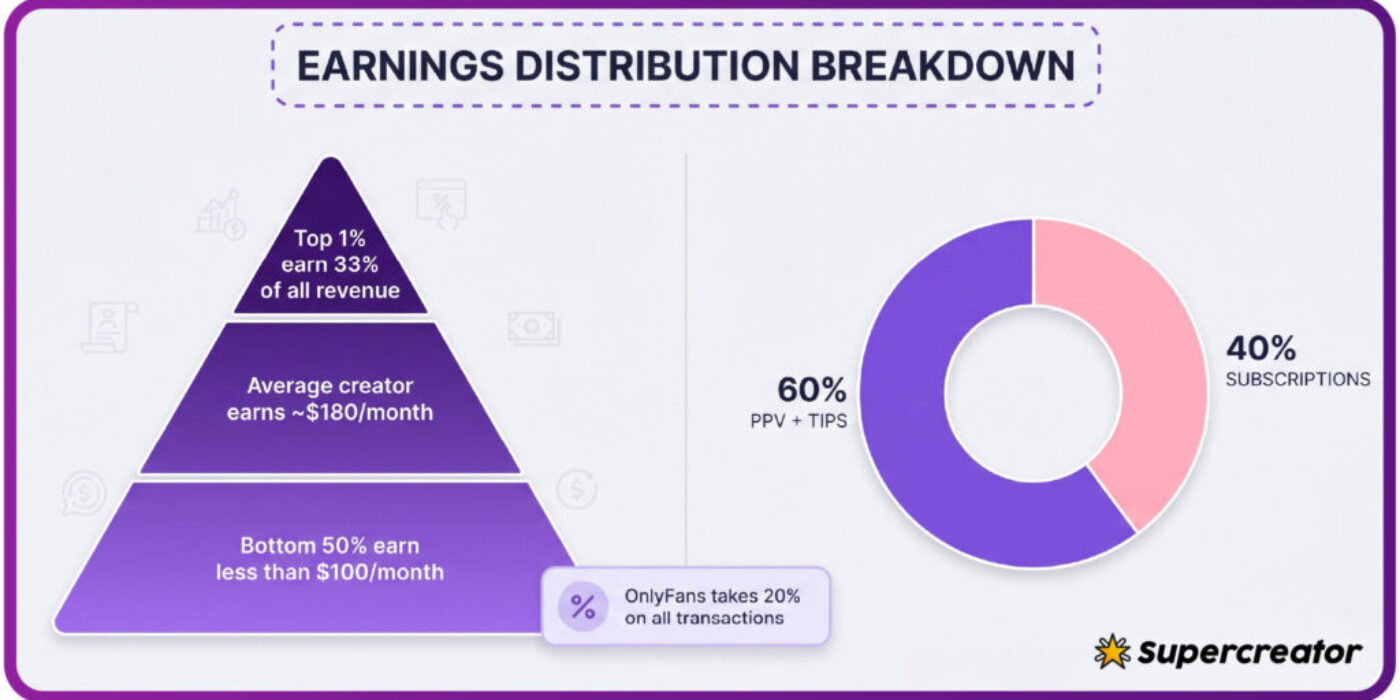
The other lever is the 20% platform fee: the creator receives 80% of what you paid. That split is one reason outcomes focus on reversing the transaction rather than adjusting it.
Card Disputes vs Platform Refunds
A chargeback is a formal process with your issuer, and it operates on its own rules and its own timeline. It is not a faster version of a support request, and the two routes are not interchangeable.
Attempting the platform route first is the conventional order, for practical reasons:
- Contact platform support with your payment reference and a short factual summary.
- Wait for the stated review outcome before escalating.
- If the request is declined, ask for the reasoning in writing.
- Only then contact your card issuer, with the support thread attached.
- Provide the issuer the same evidence: dates, amounts, and what was delivered.
Disputes filed without a prior support attempt are frequently bounced back with a request for more documentation. That costs time rather than saving it. Chargeback processes also expect a clear description of the failure, which is exactly what good notes provide.
There is a wider context here too. Payment disputes and account-security complaints share a common thread: both reward people who keep records and act quickly. The same habits that settle a billing question also help when something resembles a phishing attempt on a payment page.
That overlap is worth keeping in mind, because a fake login screen does not need your subscription history to cause damage. A moment of caution before entering card details is cheaper than repairing the consequences afterward.

Documenting a Request Properly
Support teams work from records, so anything you can attach that pins down time, amount, and access state moves the case forward. Vague descriptions force a back-and-forth that burns the window you are trying to use.
Assemble the evidence in this order before you write anything:
- Payment reference or transaction ID from your statement or email receipt.
- Date and time of the charge, plus the period it was meant to cover.
- Screenshots of the access state, including any error pages.
- A one-line summary of what you expected versus what occurred.
- Any prior messages with the creator or support about the same issue.
Keep the summary factual and short. If the issue involves a PPV unlock, note the price you paid and whether the media played at all. Paid chat commonly runs $3 to $5 per message and PPV unlocks can reach $50, so specifying the exact line item prevents your request from being matched to the wrong charge.
BestOnlyFans-style reviews rely on the same discipline: fixed criteria, recorded observations, consistent dates. Applying that habit to your own request costs ten minutes and removes most ambiguity.
A card verification hold of $0.10 is refunded within days and should never be disputed as a subscription.
Realistic Timelines for Outcomes
Nobody can promise a specific number of days, and guides that do are guessing. What you can control is how long your own side takes and how much friction the request creates.
These factors stretch or shorten the process:
- Shortens it: payment reference included, timestamps accurate, unused access period, one clear issue.
- Shortens it: a polite, factual summary that answers the obvious follow-up questions in advance.
- Stretches it: multiple unrelated issues bundled into one request.
- Stretches it: access used after the disputed charge, which weakens the unused-period argument.
- Stretches it: a dispute filed in parallel with a support request, which can stall both.
Card disputes carry their own clock and often take longer than platform review. Escalating early does not compress that clock; it usually adds a second process running alongside the first.
Check active subscriptions monthly, cancel before the renewal date rather than on it, and keep promotional pricing in mind so an expected increase does not read as an error.
Ranking sites exist precisely because the platform has no built-in discovery feed or directory. That absence means subscribers often arrive from third-party comparisons, and those same sites are a reasonable place to check how a page presents its pricing before you subscribe. If you are weighing free pages against paid ones while sorting out a billing question, the phrase best only fans free is the kind of search that surfaces those comparisons.
FAQ
Can I get a refund after a renewal I forgot?
It depends on timing and usage. If you contact support shortly after the charge and the newly paid period is unused, the request has a reasonable basis. If you used the period for days before asking, the case weakens considerably.
Does a mid-cycle price change affect my current charge?
When a creator raises the price, auto-renew stops and existing access lasts until the paid period ends. Your current charge stands as billed, so the decision is whether to renew at the new rate.
Are PPV unlocks refundable if I did not like the content?
Generally no. If the media failed to load or play, that is a technical access failure and a much stronger case.
Should I file a card dispute or use platform support?
Start with platform support. Give them the payment reference, dates, and a short factual summary, then wait for the outcome before contacting your issuer.